How HelmetAdda Runs a 400+ Variant Riding-Gear Catalog with BOB
 KartSmith Team
🪖 How HelmetAdda Runs a 400+ Variant Riding-Gear Catalog with BOB
How a leading riding-gear store scaled 20+ collections, per-collection size charts, image-based variant selection, and AI-powered recommendations on Shopify — without touching a line of theme code.
On this page
- 1. A catalog built for a category that punishes shortcuts
- 2. Meet HelmetAdda
- 3. Two problems, one product page
- 4. Configuration layer one — 400+ variants, chosen by graphic
- 5. Configuration layer two — shell sizes, not shirt sizes
- 6. How BOB fixed the configuration layer
- 7. The discovery problem — buying helmets is comparison shopping
- 8. How BOB fixed the discovery layer
- 9. Completing the rider's kit
- 10. Why this matters beyond helmets
- 11. Two pillars, one app, zero theme code
- 12. Run a catalog like this? Try BOB.
1. A Catalog Built for a Category That Punishes Shortcuts
HelmetAdda’s catalog spans 20+ active collections across every segment a rider might fall into — sport-touring, premium full-face, adventure and off-road, modular touring, heritage and café-racer styles. Sport-tourers, premium full-face lids, retro café-racers like the Retro Seven, and adventure helmets each live in their own world, built on their own shells, for their own kind of rider.
Add up the collections, multiply by the roughly 20 colorways each one ships, and you're looking at 400+ active variants on the store at any given time.
That's a lot of SKUs. But the real story isn't the scale — it's the fact that helmets aren't t-shirts. This is safety gear. Fit matters. Shell geometry matters. A shopper who picks the wrong size doesn't return a helmet, they ride in one that doesn't protect them properly. That's the category HelmetAdda operates in, and it's a category that punishes the shortcuts most Shopify stores quietly rely on.
This is a story about what happens when you can't take those shortcuts — and how BOB helped HelmetAdda build a product experience that matches the seriousness of the product itself.
2. Meet HelmetAdda
Before we get into the setup, a quick orientation. HelmetAdda stocks helmets and riding gear for pretty much every kind of rider:
- Sport-touring — full-face helmets built for long highway runs
- Premium full-face — helmets with a focus on refinement
- Retro — heritage, café-racer and open-face styling, like the Retro Seven
- Adventure & off-road — peak visors and adventure-specific shells
- Riding gear — gloves, jackets, riding pants and accessories that complete the kit
Each collection has its own graphic language, its own pricing, and — the detail that matters most for this story — its own shell architecture.
3. Two Problems, One Product Page
Every high-consideration retailer runs into the same two problems on a product page, and HelmetAdda runs into both at industrial scale.
The first is the configuration problem: can the shopper pick the right SKU without friction? The right finish, the right colorway, and — for a safety product — a size built on the right shell. Get any layer wrong and the sale either doesn't happen or happens incorrectly. For a helmet retailer, "incorrectly" isn't a return ticket; it's a rider in the wrong fit.
The second is the discovery problem: once the shopper is engaged, can the store surface the next relevant helmet before they leave to compare elsewhere? Helmet buying is rarely a first-click decision. Riders weigh two or three models against each other before committing, and every tab they open on a competitor's site is a conversion at risk.
Default Shopify handles neither well at this scale. Dropdowns can't communicate the difference between a gloss sport-tourer and a matte one in a different livery. A single global size chart can't serve a catalog where shell geometry changes collection by collection. And a static "related products" grid can't replace the comparison shopping a buyer is about to do anyway.
This is where BOB does the heavy lifting — across both problems, on the same product page, without a line of theme code.
4. The Configuration Problem, Layer One — 400+ Variants, and Buyers Who Choose by Graphic
Here's the first thing to understand about helmet shoppers: they don't pick by SKU code. They pick by how the helmet looks on their head in the mirror.
That makes the variant picker one of the most important parts of the entire store. Between two sport-tourers in near-identical red, white and blue colourways, the difference is entirely in the livery — the graphic, the color blocking, the way the decals wrap around the shell. You can't communicate that with a dropdown labeled "Color." And a plain red dot doesn't tell the shopper whether they're getting a subtle two-tone or a full racing graphic.
Multiply that by ~20 colorways per collection, across 20+ collections, and you have a product page that needs to behave more like a configurator than a standard Shopify PDP.
5. The Configuration Problem, Layer Two — Shell Sizes, Not Shirt Sizes
Now the part most people miss.
In helmet manufacturing, shell geometry differs across collections. A full-face sport-touring helmet is built on a different shell than an adventure helmet with a peak visor, which is built on a different shell than a retro open-face. These aren't cosmetic differences — they're structural ones, driven by the helmet's intended use.
Which means this: an "XS-54" in a sport-touring helmet is not the same shell as an "XS-54" in an adventure helmet. The label on the size pill is identical. The helmet on your head is not.
For a helmet retailer, this has one serious consequence: you cannot use a single global size chart. If you do, you're telling half your buyers the wrong fit. In apparel, wrong sizing is an inconvenience. In safety gear, it's a safety issue.
So HelmetAdda needed something Shopify doesn't natively offer: a size chart per collection, served automatically based on which helmet the shopper is looking at. The shopper viewing a sport-tourer sees sport-touring sizing. The shopper viewing an adventure helmet sees adventure sizing. No manual work per PDP. No universal chart pretending one size standard fits every shell.
This is the problem that makes the HelmetAdda setup genuinely unusual. And it's the one that most decided the choice of app.
6. How BOB Fixed the Configuration Layer
BOB replaced Shopify's default variant selector across every HelmetAdda collection with an image-first configurator built for exactly this kind of catalog. On the product page today, you'll see:
- Texture swatches — Gloss and Matte rendered as actual tile previews, so the finish choice is visually obvious
- Colorway thumbnails — each of the ~20 liveries shown as a small helmet image, so the shopper previews the exact livery before selecting
- Size pills — labeled with both grade and head circumference (XS-54, S-55, M-57, L-59, XL-61, XXL-62), paired with a Size Chart link
- Per-collection size charts — the right chart served automatically based on the collection's shell geometry
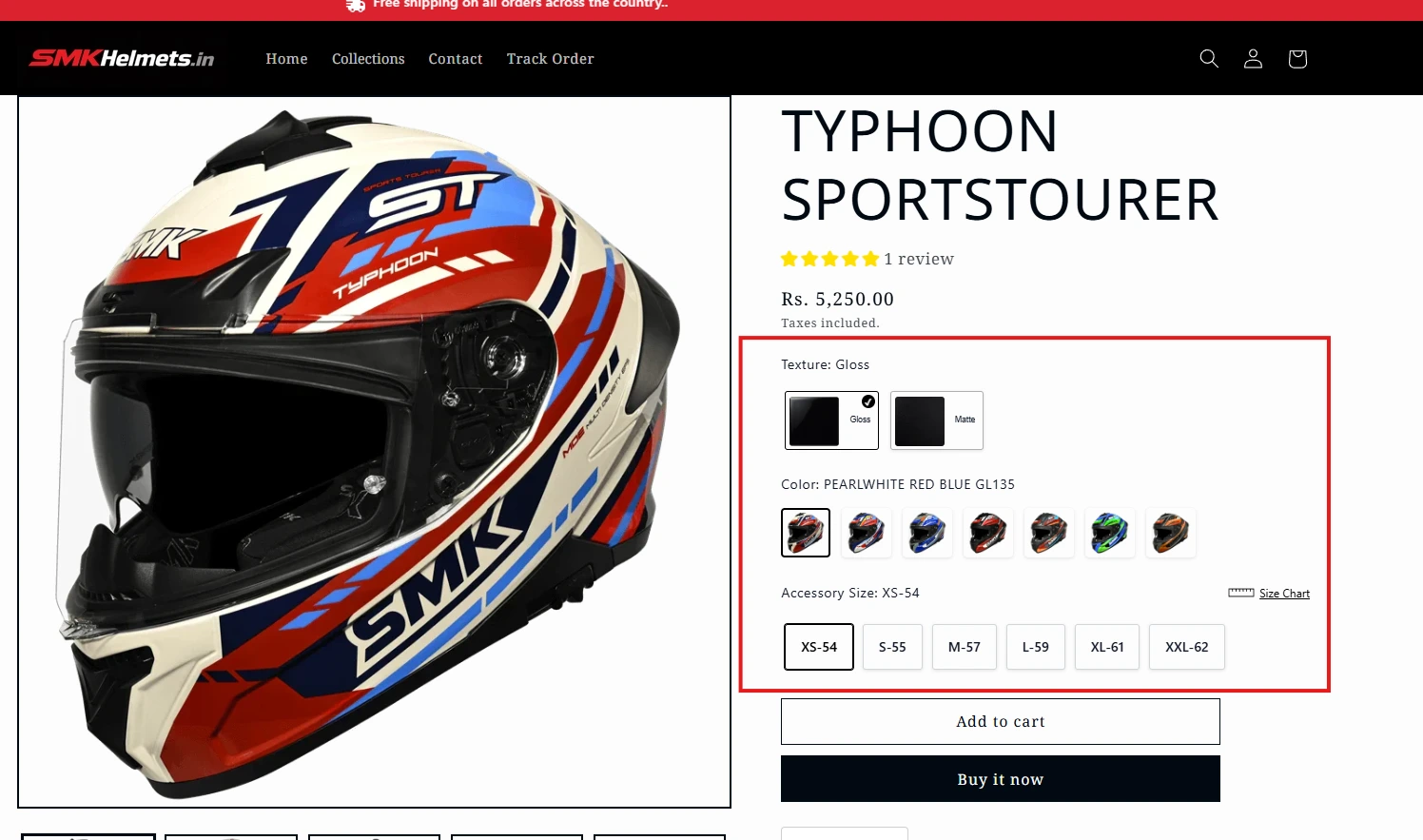
The important detail: this pattern was deployed once, and scales to the whole catalog. A new livery ships? The variant picker just works. New collection launches with its own shell and its own sizing? The size chart logic handles it without a theme edit.
One pattern, 400+ variants covered, zero custom theme code. That's the configuration pillar.
7. The Discovery Problem — Picking a Helmet Is a Comparison Exercise
Helmet buyers almost never buy the first model they view.
In a category where price bands overlap, finishes differ subtly, and graphic liveries are half the appeal, shoppers routinely compare two or three models before they commit. That comparison happens somewhere — and if the product page doesn't host it, the shopper goes back to the collection grid, opens new tabs, or leaves the store entirely to cross-check on Google.
Every one of those exits is a conversion risk. Every tab opened on a competitor's site is a shopper who may not return.
The problem compounds at HelmetAdda's scale. With 20+ collections across sport-touring, off-road, modular, and retro segments, a sport-touring shopper has at least half a dozen alternatives within HelmetAdda's own catalog worth considering — other liveries, other sport-tourers, adjacent price bands. Without intelligent discovery on the PDP, that internal comparison simply doesn't happen. The shopper either buys the one helmet they landed on, or they leave to compare, and most of them leave.
What the PDP needs to do is collapse the comparison exercise into the page itself. The shopper shouldn't have to go find the next relevant helmet — the store should bring it to them, at the exact moment their intent is highest, with enough interactivity that switching models doesn't cost a click.
That's the second pillar of HelmetAdda's BOB setup. And it sits directly below the Buy Now button for a reason.
8. How BOB Fixed the Discovery Layer
Look at what sits under the Buy Now CTA on an HelmetAdda product page and you'll see a "You may also like this…" module. It looks like a related-products widget. It isn't.
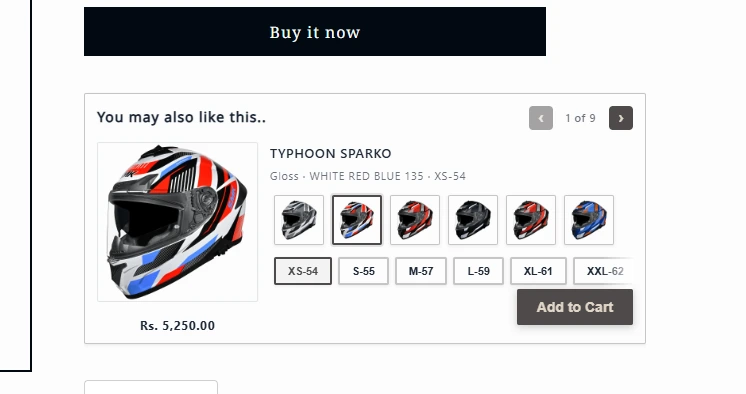
A few things are happening here that a standard Shopify cross-sell doesn't do:
- It's placed at peak intent. Not buried at the bottom of the page. Not lost below the reviews. It sits directly under the CTA — the exact spot where a shopper is either about to commit or about to leave and compare. BOB shows them the next option before they get up to go.
- The recommendations are category-aware. A sport-touring shopper doesn't get shown an unrelated off-road helmet from a different segment. BOB's AI tunes the picks to riding segment, price band, and style — so the next suggestion is actually a relevant alternative, not a random cross-sell.
- Variant selection happens inline. Color and size are picked inside the recommendation card itself. The shopper doesn't leave the current PDP. The comparison happens in place.
- Add to Cart is one click. With the chosen configuration preserved. No PDP detour, no context loss, no re-picking the size.
- There's a paginated carousel — "1 of 9" — so the full cross-sell set is reachable without cluttering the layout.
This is the second half of the story. If the configurator's job is to get the right helmet chosen, the cross-sell's job is to make sure the next helmet gets considered — before the shopper leaves to consider it somewhere else.
9. Completing the Rider's Kit
A helmet is rarely the only thing a rider needs. Gloves, a phone mount for navigation, a riding jacket and pants — the rest of the kit is where a single-item order quietly becomes a much bigger one. HelmetAdda uses BOB to put that kit in front of the shopper at the right moment, in two formats.
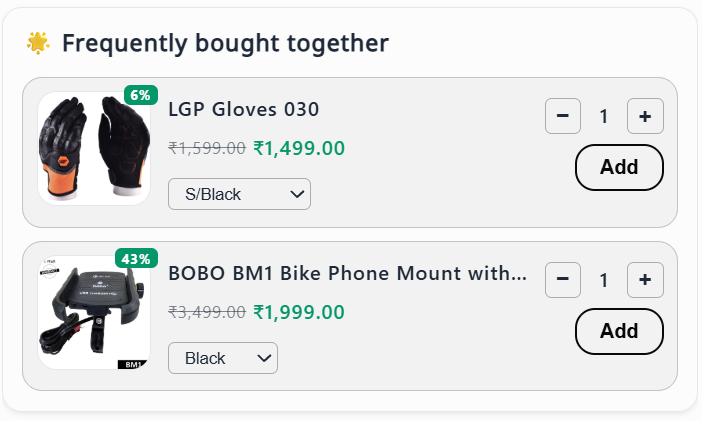
Frequently bought together. On the product page, BOB surfaces the accessories riders actually pair with the item — like riding gloves and a bike phone mount — each with its own variant picker, quantity stepper and a one-tap Add. The discount is shown right on the product tile, so the saving is obvious without leaving the page.
Frequently bought bundles. For riders building a full set, BOB lays out the whole look — a Retro Seven helmet, riding gloves, a touring jacket and riding pants — as one visual bundle, with prices and savings on every card and a quick-view on each item.
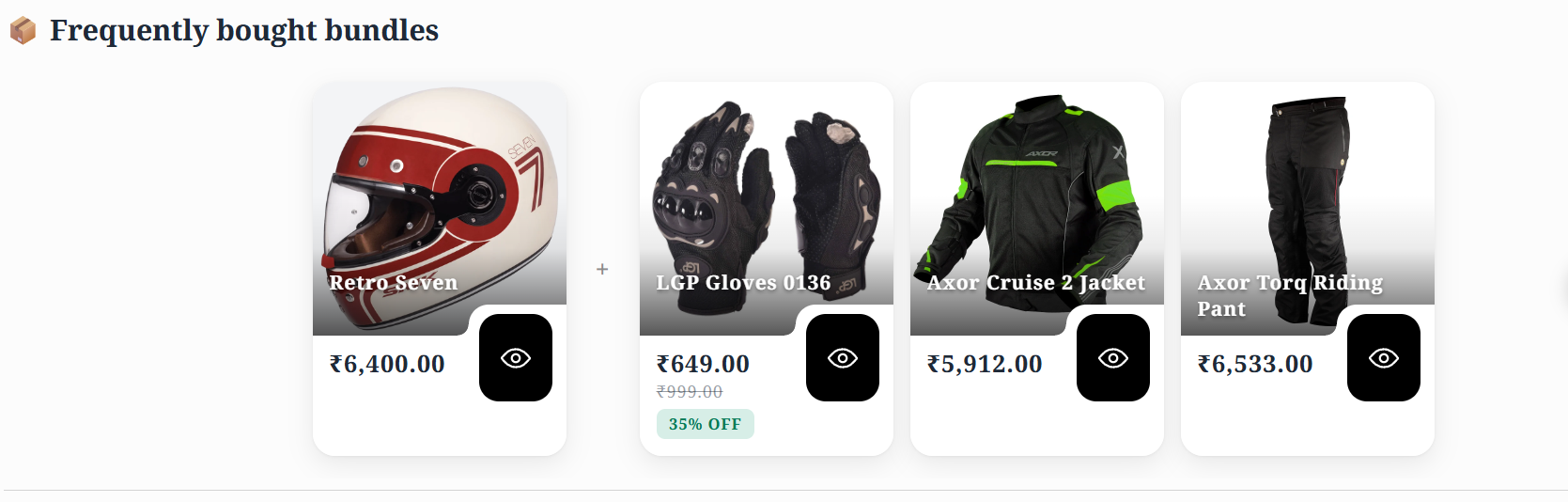
Both widgets stay in sync with HelmetAdda's Shopify inventory and were set up without theme code — the same way as the configurator and cross-sell above.
10. Why This Matters Beyond Helmets
The HelmetAdda setup isn't really a helmet story. It's a template for any merchant running a catalog with three features:
- Many visual variants per product — automotive parts, technical footwear, eyewear, performance apparel, anything where buyers choose by look
- Collection- or series-specific specs — platform fitment, last shape, frame geometry, cut
- Comparison-heavy, considered purchases — products where shoppers weigh two or three options before committing
In all of these categories, default Shopify forces a trade-off between scale and specificity. You can have a clean store that doesn't communicate product nuance, or a nuanced store that breaks when you add the next collection. BOB removes that trade-off. The configurator handles catalog complexity. The AI cross-sell handles comparison behavior. Together, they turn a scale-heavy store into one that actually converts.
11. Two Pillars, One App, Zero Theme Code
What HelmetAdda's setup proves is that a Shopify catalog of almost any scale or complexity can be made to behave like a purpose-built commerce experience — if the right app handles the right layer.
On the configuration side, BOB turned a 400+ variant catalog into a consistent, visual, image-first configurator. Texture swatches, colorway thumbnails, and size pills replaced default dropdowns across every collection, and — critically for a safety-first category — per-collection size charts mapped to actual shell geometry eliminated the universal-sizing trap most helmet stores fall into.
On the discovery side, BOB placed AI-powered cross-sell directly below the Buy Now CTA, tuned to riding segment and price band, with inline variant selection and one-click Add to Cart. The comparison exercise that used to happen across tabs now happens inside a single card on the product page.
Both pillars shipped without theme surgery. Both scale automatically as new collections launch. And both compound — a configurator that gets the right helmet chosen makes the cross-sell that follows more relevant, and a cross-sell that gets the next helmet considered extends the session that the configurator started.
For any merchant running a visual, specification-heavy, comparison-driven catalog — helmets or otherwise — that's the playbook: let BOB handle configuration, let BOB handle discovery, and let the theme stay untouched.
12. Run a Catalog Like This? Try BOB.
If your Shopify store has more variants than dropdowns can handle, more collections than one size chart can cover, or more comparison shopping than a static related-products grid can catch — BOB was built for stores exactly like yours.
Want this guide as a PDF?
Get the complete article delivered to your inbox for easy reference and offline reading.
The Shopify Store Building Guide
Everything merchants are actually doing right now — not last year's playbook.
Mix-and-match bundles, Buy X Get Y, per-collection variant configurators, cart drawers that close the loop, community deals. One PDF. Updated this quarter with live case-study patterns.