How a UK Print Shop Sells Brand Kits to Startups — Using BOB's Mix-and-Match Bundles
 KartSmith Team
🧰 How a UK Print Shop Sells Brand Kits to Startups — Using BOB's Mix-and-Match Bundles
How Discount Print Online replaced rigid packs with a 4/9/18-item bundle builder — letting startups configure their own merch mix across sizes, colours, and products, with volume-tier pricing that rewards the trade up.
On this page
- 1. A print catalog built for professionals
- 2. Meet Discount Print Online
- 3. A catalog built for pros, a visitor who isn't one
- 4. A builder, not a bundle
- 5. The builder in action — buy more, save more
- 6. A cart drawer that keeps the bundle intact
- 7. The math — a savings ladder
- 8. Why this matters beyond print
- 9. Two pillars, one app, zero theme code
- 10. Sell kits, not SKU lists
1. A Print Catalog Is Built for Someone Who Already Knows What They Need
Print is one of the most variant-heavy categories on Shopify. A single flyers product on Discount Print Online's store has over 90 variants — single or double sided, five paper weights, nine quantity tiers. For a designer placing their seventeenth order of flyers, that depth is a feature. For a founder who just filed their Companies House registration and needs "some merch for the team and a few hoodies for our launch," it's paralysis.
The question this post is about: how does a print shop built for professionals make itself legible to first-time buyers — without dumbing down the catalog for everyone else?
2. Meet Discount Print Online
Discount Print Online is a UK wholesale print shop with a catalog that runs the full professional range — flyers, posters, banners, business cards, stationery, stickers, custom clothing. The kind of shop a marketing agency or an established brand has on speed dial. Good quality, competitive prices, fast turnaround. But that same depth — the thing that serves their regular buyers well — is exactly what overwhelms the early-stage founder visiting for the first time.
3. A Catalog Built for Professionals, a Visitor Who Isn't One
The real mismatch: a startup founder shopping for launch merch has a different job to do than a print professional. They don't know what GSM they need. They don't know the difference between 130gsm gloss and 170gsm silk. They don't know how many flyers is "enough" for a pop-up event. They just know they need some hoodies for the team, a few T-shirts for giveaways, maybe a Polo for customer-facing staff.
The merchant's choice is binary. Either simplify the whole catalog — which damages the experience for professional buyers who need the depth — or leave the founder to figure it out, which means losing them to Vistaprint. Neither is a good option.
BOB lets Discount Print Online do a third thing: keep the full catalog for professionals, and run a completely different storefront — one configurator product, one tiered bundle builder — for first-timers. Two experiences, one store.
4. A Builder, Not a Bundle
The instinct, when selling to first-time buyers, is to build rigid starter kits — "Our Startup Pack: 1 Hoodie, 1 T-shirt, 1 Polo." Simple, clean, productized. And wrong for this category, because no two founders need the same mix. A two-person founding team needs two sizes of hoodie. A launch event needs twelve T-shirts in one colour. A founding-day giveaway needs a mix of everything.
What Discount Print Online built with BOB is a builder, not a bundle. The product on the page looks like a bundle — three tiers, fixed prices — but inside each tier, the buyer configures the entire thing themselves. Which products. How many of each. What sizes. What colours. The "bundle" is really a price tier; the content is always bespoke.
This is the distinction that makes the whole mechanic work. A fixed bundle asks the buyer to accept someone else's guess about what they need. A builder with tiered pricing asks them to make their own choice, at a price that scales with their commitment. For a category where every buyer's situation is different, that's the difference between a sale and a bounce.
5. The Builder in Action — Buy More, Save More, Mixed How You Like
On the Starter Pack (and Growth Pack, and Premium Pack) product page, BOB shows a "Buy more, save more" panel with three tabs:
- 4 Pack — £105 (saves £10.96)
- 9 Pack — £179 (saves £77.91)
- 18 Pack — £349 (saves a steeper amount again)
The buyer picks a tab. The panel opens the builder. Now they configure.
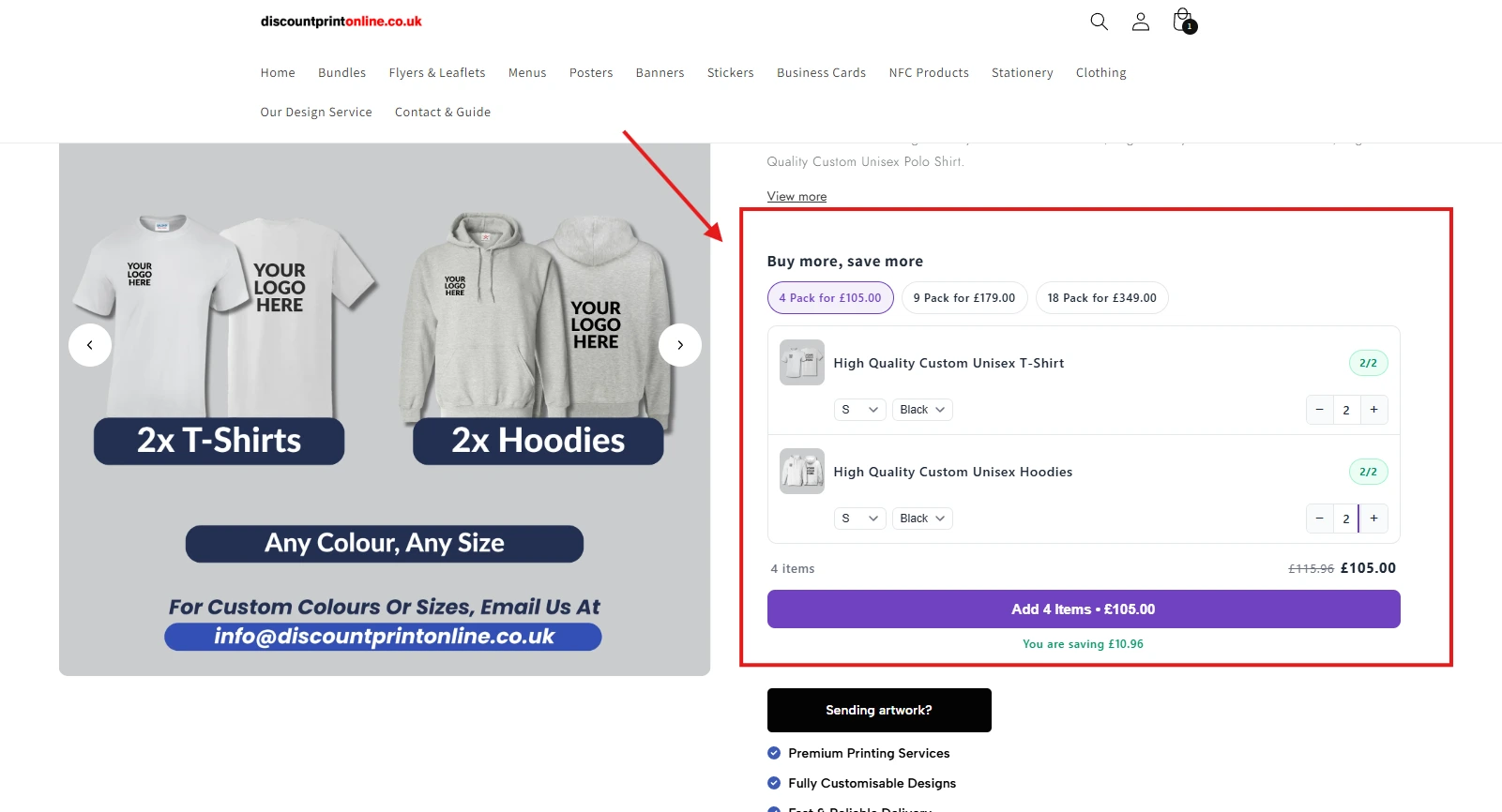
Inside each product row: an item picture, a product name, a size dropdown, a colour dropdown, a quantity stepper. The buyer is free to add any combination of T-shirts, Hoodies, and Polos until the tier is full. A small counter on each row — "2/2," "3/3," "4/4" — shows progress against the tier they chose. The "Add Items" CTA at the bottom stays disabled until the tier is complete, so the buyer always knows exactly where they are in the flow.
The detail that matters most is the per-item variant control. A single tier can contain multiple size/colour combinations of the same product. Here's what that looks like on a fuller build:
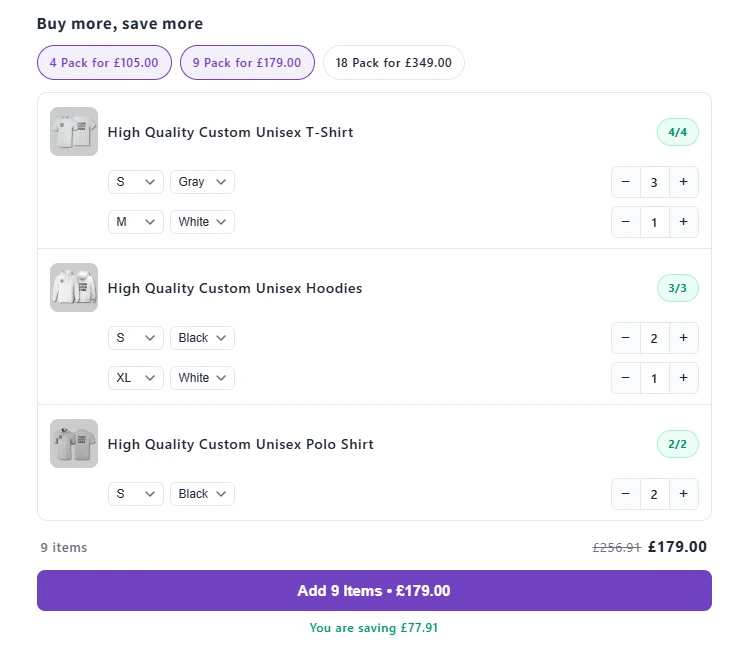
This is what separates a builder from a rigid pack. The founder isn't forced to buy three hoodies in the same size. They can configure two Smalls for the founders, one Extra-Large for the developer who's tall. They can mix colours for a team that wants branded merch but with some visual variety. They can build exactly the kit they need — and BOB treats the whole configuration as a single bundle at a single tier price.
Above the CTA, the savings are shown in plain terms: £256.91 struck through, £179.00 in bold, and "You are saving £77.91" in green underneath. Nothing hidden. The buyer sees the tier price, the walk-up price, and the saving side by side.
The three tier tabs stay visible throughout. A buyer building a 4 Pack can see, at a glance, that the 9 Pack offers more than seven times the savings for just over 1.7 times the price. The upsell isn't a popup. It's the UI itself — always visible, never interrupting.
6. A Cart Drawer That Keeps the Bundle Intact
Add a 4 Pack to the cart and most bundle apps do one of two things: either dump four loose line items into the cart (losing the bundle identity entirely), or show the bundle as a single row with the contents hidden (losing transparency). BOB does neither.
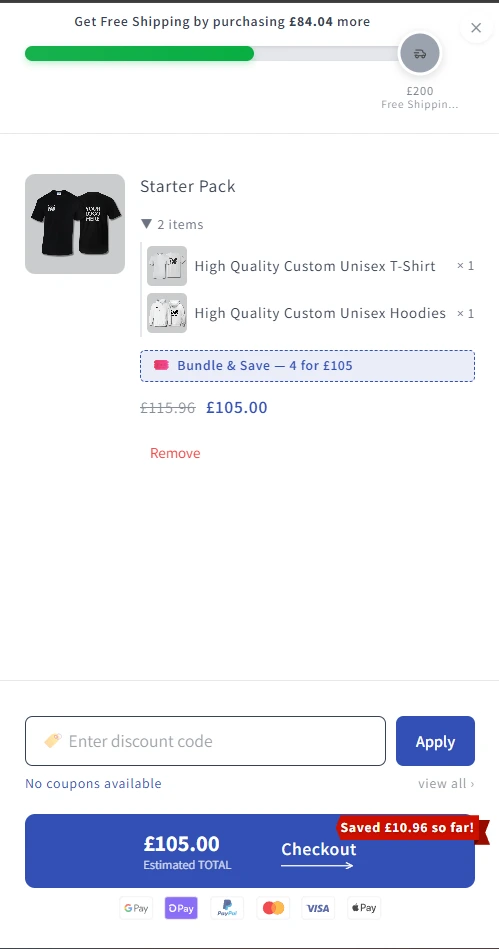
The Starter Pack appears as one parent line item labelled "Starter Pack · 4 items," with a small dropdown that expands to show the two T-shirts and two Hoodies nested inside. The buyer sees their configuration — the exact mix-and-match they built on the PDP — without the cart becoming a cluttered list. Imagine the alternative on an 18 Pack: eighteen loose rows, no sense of what the buyer actually ordered. BOB preserves the bundle as the unit of purchase, because that's how the buyer thinks about what they bought.
Underneath, a pink pill: "Bundle & Save — 4 for £105." The original walk-up price of £115.96 is struck through. The saving is visible, attributed, and named. Not hidden in the total.
Around the bundle, four more things are happening:
- A threshold nudge at the top of the drawer. "Get Free Shipping by purchasing £84.04 more," with a green progress bar already past halfway to the £200 threshold. A 4 Pack buyer who adds a Polo shirt or a few flyers gets free shipping — and the drawer makes that math visible without having to calculate it.
- A savings reinforcement beside the Checkout CTA. A red "Saved £10.96 so far!" ribbon sits next to the estimated total. Small detail, real impact: post-purchase regret gets front-run by the store confirming, visibly, that the buyer came out ahead on this transaction.
- An honest coupon state. "No coupons available" appears under the discount code field — not a blank invitation to go Googling for codes and abandon when none exist. The shopper is told, clearly, not to look. One of the most common abandonment patterns in ecommerce, closed off with one line of copy.
- A UK-localised payment stack. Under the Checkout CTA, icons for GPay, Shop Pay, PayPal, Mastercard, Visa, and Apple Pay. For a UK-based print shop selling to founders who almost certainly use Apple Pay or Shop Pay on their phones, this is the right payment surface. Showing it in the drawer — before the buyer hits the checkout page — removes the "wait, do they accept…?" hesitation at the moment of commitment.
This is where the second pillar earns its place. The PDP builder gets the configuration right. The cart drawer makes sure the configuration, the discount, the trust signals, and the next nudge are all visible in one clean view — so the buyer has no reason to slow down between "Add to Cart" and "Pay."
7. The Math — A Savings Ladder That Gets Steeper as You Climb
A simple side-by-side:
| Tier | Walk-up price | Bundle price | Saving | % saved |
|---|---|---|---|---|
| 4 Pack | £115.96 | £105.00 | £10.96 | ~9% |
| 9 Pack | £256.91 | £179.00 | £77.91 | ~30% |
| 18 Pack | ~£513 (est.) | £349.00 | ~£164 | ~32% |
The 4 Pack saving is modest — it's the entry price. The 9 Pack saving jumps sharply, because that's the tier the pricing is engineered to sell. Thirty per cent off for doubling your order is a genuinely strong offer, and it's the one most buyers will take. The 18 Pack extends the logic for buyers with bigger teams or bigger launches.
The ladder isn't a trick. It's the store telling the buyer, in plain numbers: "Commit more, save more." Every buyer finds the tier that fits them.
8. Why This Matters Beyond Print — A Pattern for Any Multi-SKU, Volume-Sensitive Catalog
Discount Print Online sells custom clothing. The pattern generalises cleanly to any store where:
- The catalog has multiple related SKUs that buyers often purchase together — cosmetics brands bundling skincare, coffee roasters bundling beans, supplement brands bundling stacks, pet brands bundling food and treats, office supply shops bundling stationery kits, corporate gifting, event merch, hamper and gift companies.
- Buyers are volume-sensitive — they'll commit to a larger purchase if the pricing rewards it, but they won't accept a rigid bundle that doesn't match their use case.
- Use cases vary — what buyer A needs is different from buyer B, so a configurable mix with tiered pricing works where a fixed bundle wouldn't.
In every one of these categories, the merchant's real job isn't to pick the right bundle mix for the buyer. It's to give the buyer the freedom to mix it themselves, at a price that rewards commitment. BOB is what makes that possible without a custom build.
9. Two Pillars, One App, Zero Theme Code
What Discount Print Online's setup proves is that "productized" and "flexible" aren't opposites. The right app lets you sell a bundle that's rigid in its pricing and flexible in its contents — giving the buyer predictability on what they'll pay and freedom on what they'll get.
On the PDP side, BOB turned a catalog built for professionals into an entry point built for founders: a mix-and-match builder with three tiers, per-item size and colour control, and visible tier savings that nudge the trade up.
On the cart side, BOB kept the bundle intact through to checkout — presenting it as one expandable line item, attributing the discount, teasing free shipping, and surfacing UK-localised payment trust icons — so the buyer had no reason to hesitate between configuration and payment.
Both pillars shipped without theme code. Both coexist with Discount Print Online's full professional catalog, running in parallel — the depth stays for the buyers who need it, and a cleaner path exists for the buyers who don't.
For any merchant with a deep catalog and two buyer archetypes, or a volume-sensitive category where one rigid bundle won't fit every use case, the playbook is the same. Let BOB handle the configuration. Let BOB handle the cart. Let the theme stay untouched.
10. Sell Kits, Not SKU Lists. Try BOB.
Built for merchants whose products sell better together than apart — at tier pricing the buyer can see and choose.
Want this guide as a PDF?
Get the complete article delivered to your inbox for easy reference and offline reading.
The Shopify Store Building Guide
Everything merchants are actually doing right now — not last year's playbook.
Mix-and-match bundles, Buy X Get Y, per-collection variant configurators, cart drawers that close the loop, community deals. One PDF. Updated this quarter with live case-study patterns.
Keep reading
How Malgudi Arts Lifts Cart Value by 32% with BOB's Buy X, Get Y Bundles
How a devotional and gifting brand grew average order value by adding a second bronze piece to the cart — at a discount on the add-on, never on the hero product — and closed the loop with a cart drawer built for Indian shoppers.
RelatedHow SMKHelmets.IN Runs a 400+ Variant Shopify Catalog with BOB
How a leading helmet brand scaled 20+ collections, per-collection size charts, image-based variant selection, and AI-powered recommendations on Shopify — without touching a line of theme code.